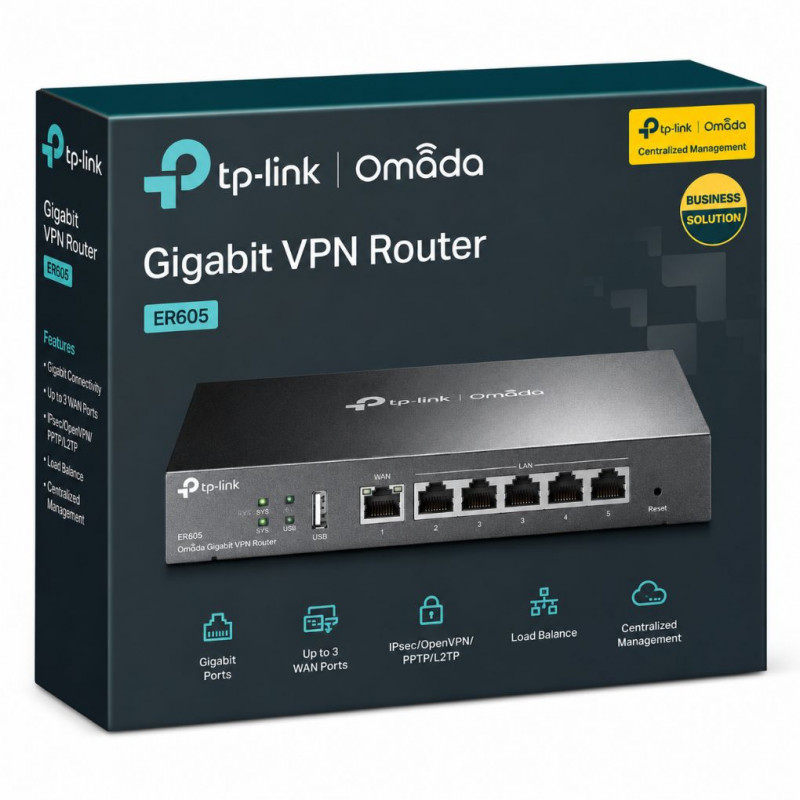



TP-Link Omada ER605 Gigabit VPN Router Multi-WAN Business Network Gateway with Load Balance and VPN

€66.50
€79.90
Save €13.40
Tax included
Stock status: Moderate
In stock
Quantity

The TP-Link Omada ER605 Gigabit VPN Router is a professional business networking solution designed for secure, stable, and high-performance internet management. Featuring multiple Gigabit WAN and LAN ports, advanced VPN capabilities, intelligent load balancing, and Omada SDN cloud management, this router is ideal for offices, shops, warehouses, and enterprise environments. The ER605 provides enhanced network security with advanced firewall protection, IP/MAC/URL filtering, and support for multiple VPN protocols including OpenVPN, IPsec, PPTP, and L2TP. Its compact design and reliable performance make it an excellent solution for businesses requiring secure remote access and optimized bandwidth management.

Specifications:

  • Brand: TP-Link
  • Model: Omada ER605
  • Version: ER605(UN) Ver 2.0
  • Type: Gigabit VPN Router
  • WAN Ports: 1× Gigabit WAN
  • WAN/LAN Ports: 2× Gigabit WAN/LAN
  • LAN Ports: 2× Gigabit LAN
  • USB Port: 1× USB 2.0
  • VPN Support: OpenVPN, IPsec, PPTP, L2TP
  • Security Features: Firewall, DoS Protection, IP/MAC/URL Filtering
  • Network Management: Omada SDN Cloud Management
  • Load Balancing: Multi-WAN Load Balance
  • Monitoring: Intelligent Network Monitoring
  • Dimensions: 158 × 101 × 25 mm
  • Connectivity: Wired Ethernet
  • EAN: 6935364089597

Key features:

  • Professional Gigabit VPN router for business environments
  • Supports multiple VPN protocols for secure remote access
  • Multi-WAN load balancing for optimized internet performance
  • Advanced security protection against network threats
  • Omada SDN cloud management for centralized control
  • Intelligent traffic monitoring and bandwidth optimization
  • Compact and durable professional design
  • Ideal for offices, retail stores, and enterprise networking

In the box:

  • TP-Link Omada ER605 Gigabit VPN Router
  • Power Adapter
  • RJ45 Ethernet Cable
  • Installation Guide
WhatsApp